You’re buying a new telly and the box says 55 inches. Sounds big. But will it actually fit where you want it? How to measure a TV screen size? And what does 55 inches even mean?
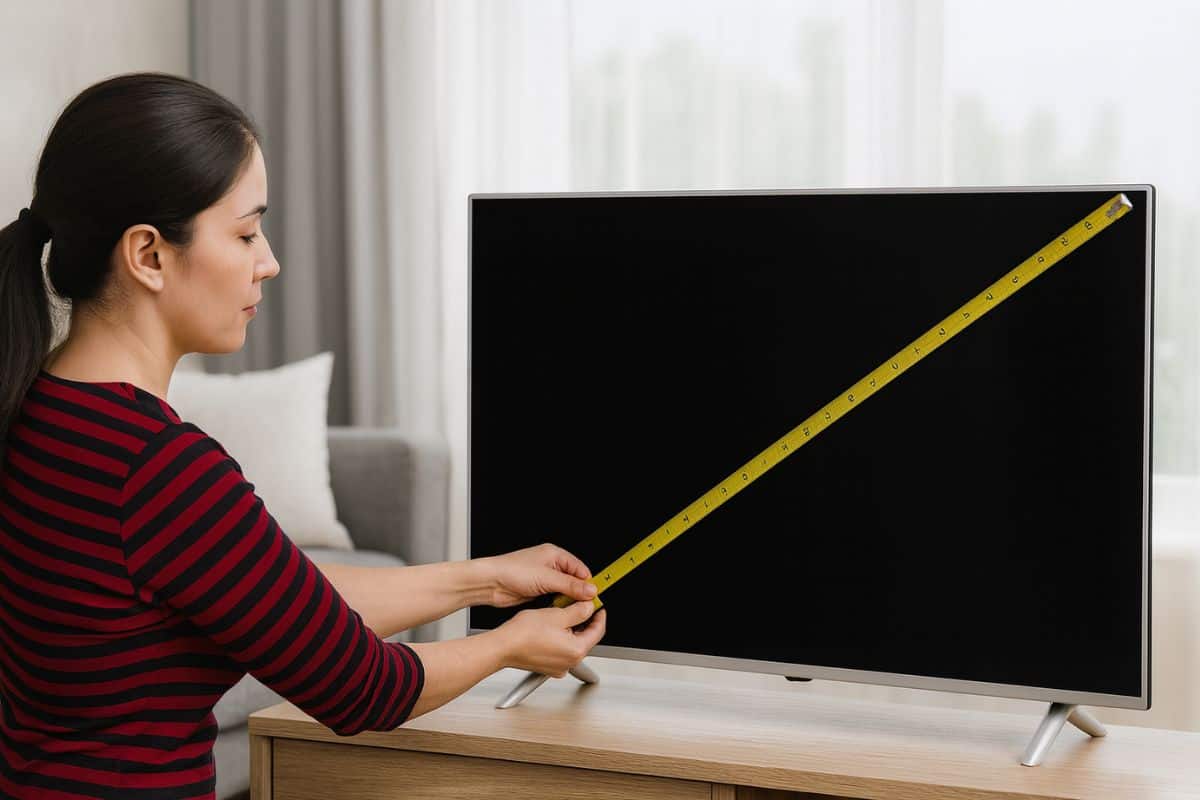
Here’s the annoying bit. TV sizes are measured diagonally. Not the width. Not the height. Corner to corner. So when someone says they’ve got a 55-inch TV, they mean from the top left corner of the screen down to the bottom right. Or the other way round. Doesn’t matter which.
Why diagonal? Goes back to when tellies had round picture tubes. The tube was circular, so measuring it diagonally made sense. That stuck around even though we’ve had flat screens for years now. Strange, but there you go.
How to Measure a TV Screen With a Tape Measure
Seriously, that’s all you need. How to measure a TV screen with a tape measure is dead simple. Put one end at any corner of the actual screen, not the plastic frame around it. Pull it across to the opposite corner. That number is your screen size.
If you get 54.6 inches, that’s sold as a 55-inch TV. They round it up for the adverts. Nobody’s going to buy a 54.6-inch television. Doesn’t sound as good.
Got a tape measure that’s in centimetres? Divide by 2.54. Or just type it into Google and add “to inches” at the end. Job done.
What You Actually Need To Know
The diagonal measurement is fine for comparing TVs in the shop. But when you’re trying to figure out if something fits on your TV stand, you need the width and height.
A 55-inch screen is roughly 48 inches wide and 27 inches tall. Just the screen, mind. The frame around it adds maybe another centimetre or so on modern tellies. Bezels are tiny now.
A 65-inch screen? About 57 inches wide, 32 inches tall. A 75-inch is around 65 inches wide and 37 inches tall.
These are ballpark figures. Different brands make things in slightly different sizes. If you need exact measurements, check the manufacturer’s website. They list everything.
Don’t Forget The Stand
This is where people get caught out. You measure the screen; it fits perfectly on your TV unit. Brilliant. Then the telly arrives, and the stand is wider than the surface you’re putting it on.
Some stands are two little legs on either side. Some have a big pedestal in the middle. The width can be narrower than the screen or quite a bit wider. Always check “width with stand” in the product specs before you buy.
Height matters too if you’re sticking it in a cabinet. That 55-inch screen might sit on a stand that adds 4 or 5 inches to the total height. Make sure your cabinet’s tall enough or you’ll be squashing the top of the TV against the shelf above.
How To Measure A TV Screen In Inches When You Haven’t Got A Tape Measure
If you can’t spot a tape measure, you may still be able to check TV size in settings. Some smart TVs even list the screen size in their system menu. It can usually be found within About or System Information. On a Samsung, click Home and then Settings, Support and About This TV. The model number should be listed there. If it says UE55 whatever, that’s 55 inches. It’s right there in the model name.
LG and Sony have very similar menus. Poke around in settings, and you’ll find it. Takes a bit of digging, but it’s there.
Sitting Distance Actually Matters
Buy a massive TV and sit too close? You’ll be turning your head just to see the whole screen. Like sitting in the front row at the cinema. Rubbish.
You should sit approximately 2.1 centimetres from a new 4K TV, which most of the new TVs are, for every inch of screen size. So a 50-inch screen is saying you should sit at least one metre away. It provides a great vantage without making you feel like the picture’s overwhelming you.
Don’t fancy doing the maths? There are loads of TV size calculators online. Type in your screen size and it will give you the optimal viewing distance. Handy if you’re trying to decide between a 55-inch and a 65-inch.
TV Wall Mounting Gets Complicated
Bolting a TV to the wall means thinking about the VESA mount. That’s the pattern of screw holes on the back. Different TV sizes use different VESA patterns.
Measure where you want it on the wall. Mark the centre. That’s where your bracket goes. Most brackets let you adjust things a bit, but you want to be roughly right from the start.
Height matters too. The middle of the screen should be about eye level when you’re sitting down. For most people, that’s around a metre off the floor. Stick it way up high, and you’ll get a neck ache.
Modern Tellies Are Basically All Screen
Remember when TVs had those thick black frames? Bezels the size of your thumb? Those are gone now. Most 2024 and 2025 models have bezels that are half a centimetre or less. Some are even thinner.
This looks great. Makes the TV seem like it’s all picture. But it also means the full dimensions are basically the same as the screen size. When you’re measuring space, you can just use the screen measurements and add maybe a centimetre on each side to be safe.
Viewing Angles On Cheap Vs Expensive TVs
If you’ve got a big room and your sofa’s off to the side, you’ll be watching at an angle. Matters more than you’d think.
Cheap LCD TVs look awful from the side. Colours wash out, and blacks turn grey. You really notice it. OLED screens don’t have that problem. You can watch from any angle and it looks the same.
If you’re buying a budget model, try to position it so you’re sitting roughly in front of it. Not way off to one side.
Why Bother Measuring At All
Look, TVs aren’t cheap. Even a basic 50-inch model is a few hundred quid. You don’t want to get it home, set it up, and then realise it’s too big for the space or too small to see properly.
Five minutes with a tape measure saves a massive headache. Measure where it’s going. Measure how far away you’ll be sitting. Check the full dimensions, including the stand. Then you know exactly what size to get.
And honestly? Write it down somewhere. Stick a note in your phone. Because in six months when someone asks what size TV you’ve got, you’ll have completely forgotten. We all do it.
How to measure a TV screen is genuinely simple. Corner to corner, just the bit that lights up. That’s it. Takes ten seconds and saves you buying the wrong size.
Recommended