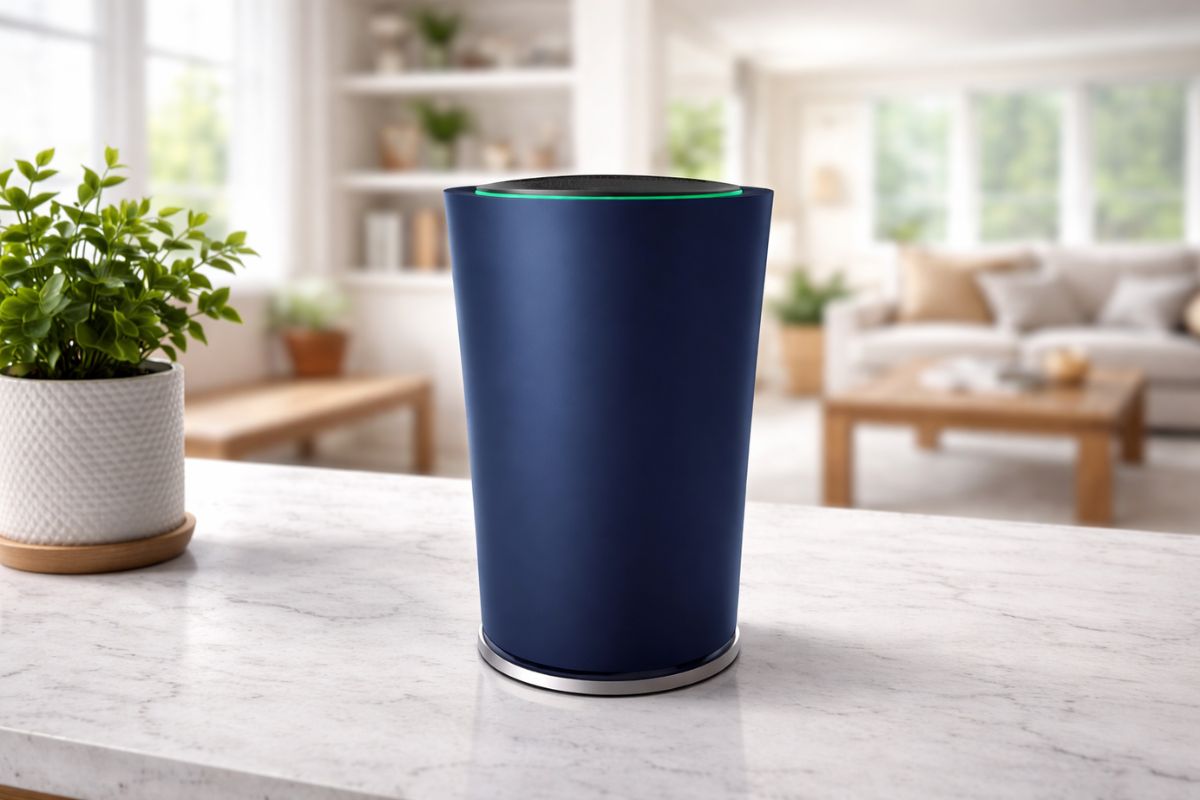
A high-performance Wi-Fi network is a key component of any modern home, but most hardware doesn’t have the longevity of the houses it serves. The experimental flagship Google OnHub router received its “End of Life” or EOL label in 2023. This shift fundamentally changed how the device works for current owners. While the hardware remains physically impressive with its circular antenna array, the software side has shifted into a legacy state. Navigating the world of home networking in March 2026 requires a clear understanding of which devices actually receive security patches and which have become “unmanaged” hardware.
Key Takeaways: The Current State Of Onhub
- Best For Quads (Antenna Performance): The 13-antenna array still provides decent signal strength, but it lacks the speed of Wi-Fi 6 or 7.
- Best For Back Safety (Security): Security is a major concern now. Since there are no more updates, the device is more vulnerable to modern threats.
- Core Engagement (App Support): The Google Home app no longer supports management, meaning settings like passwords cannot be changed.
- Beginner Friendly (Ease Of Use): It is actually quite difficult for beginners now because standard setup methods are broken.
The Shift From Smart Hub To Legacy Hardware
The Google OnHub router originally launched as a collaboration between Google and manufacturing giants TP-Link and ASUS. It was a bold move to make the router the centre of the smart home, featuring 13 internal antennas and “Wave Control” sensors. However, the tech landscape in 2026 looks very different.
Most UK fibre providers now offer speeds that far exceed the AC1900 limits of the OnHub. According to official Google Nest support documentation, features like running speed tests, adding new mesh points, and updating Wi-Fi settings were fully disabled years ago.
For those still holding onto the hardware, it essentially functions as a “dumb” access point. It will broadcast whatever Wi-Fi name and password were saved before the 2023 cutoff. But if a factory reset happens today, the device often becomes a stylish paperweight.
Without the ability to register the serial number through the modern Google Home app, the setup process hits a dead end. This is a classic example of cloud-dependent hardware reaching its natural conclusion.
Comparing The Asus And Tp-Link Models
Even though they look like identical sleek cylinders, the two versions of the OnHub had distinct personalities. The TP-Link TGR1900 was built with a specialized front-facing reflector. This was meant to boost the 2.4GHz signal in a specific direction, helping to punch through thick walls in older homes. The ASUS SRT-AC1900 took a more “sci-fi” approach. It included a sensor that allowed a person to wave their hand over the top to prioritise a specific device, like a gaming console or a 4K TV.
| Feature | TP-Link (TGR1900) | ASUS (SRT-AC1900) |
|---|---|---|
| Unique Tech | Directional Reflector | Hand-wave “Wave Control” |
| Antennas | 13 Internal | 13 Internal |
| RAM | 1GB | 1GB |
| 2026 Status | Legacy / EOL | Legacy / EOL |
The crazy part is that both models contained “dormant” Zigbee and Bluetooth radios. Google originally intended for these to be universal smart home bridges. But that day never really arrived. By the time the industry settled on standards like Matter and Thread, Google had moved on to the Nest Wifi Pro. Those built-in radios are essentially ghost tech—hardware that exists but has no software soul to drive it.
ALSO READ: What Is CAS Latency (CL)? A Guide on How to Choose the Right RAM in 2026
Modern Workarounds: Can The Hardware Be Saved?
Technically, the Google OnHub router is great hardware held hostage by dead software. In 2026, a small but vocal community of enthusiasts is keeping these units out of landfills by using third-party firmware. OpenWrt projects have successfully “unlocked” the router from Google’s cloud.
This allows it to function as a standard, highly customisable router again. It is a technical process that involves opening the shell and using a serial console, so it isn’t for everyone.
If that sounds too complicated, the only other real use for an OnHub today is as a wired secondary access point. By connecting an Ethernet cable from a newer router to the OnHub’s WAN port, it can sometimes boost a signal.
But because the settings are locked, there’s no way to control who connects or how the traffic is prioritised. It’s a little like driving a car where the hood is welded shut — it functions until it does not.
Transitioning To Wi-Fi 6e And Wi-Fi 7
Living with legacy gear in a 2026 smart home is something akin to running a modern game on an old console. The density of congestion in the 2.4 GHz and 5 GHz bands is at an all-time high. Devices like the Nest Wifi Pro feature a 6 GHz band, which is used by modern routers. This is like a VIP lane for the data — it’s much faster and can easily avoid being slowed down by the neighbour’s microwave or old baby monitors.
Most UK residents using providers like Virgin Media or Openreach full fibre will find that the OnHub actually throttles their potential speed. It was built for a time when 100 Mbps was fast. Today, with Gigabit connections becoming the norm, an AC1900 router just can’t keep up with the demand of multiple 8K streams and smart security cameras.
FAQs: Common Questions
Q1. Can An Onhub Router Be Set Up As A New Device Today?
Generally, no. The Google Home app has removed the setup flow for these models. If it hasn’t been configured previously, it likely won’t work with official software.
Q2. Is It Safe To Use An Onhub Without Security Updates?
It is risky. Without patches, the router is vulnerable to new exploits. For a home network handling banking and personal data, an updated router is a necessity.
Q3. What Is The Best Replacement For A Google Onhub?
The Nest Wifi Pro is the direct successor. It integrates perfectly with the Google Home app and supports the latest Wi-Fi 6E standards.
Q4. Can The Onhub Be Used As A Mesh Point For Nest Wifi?
No. Compatibility for adding OnHub as a mesh node ended in early 2023. It cannot be combined with newer Google or Nest systems.
ALSO READ: Who Is Hettie Jago Married To? A Look At Her Marriage, Children, And Life In London Home
Final Thoughts
Technology moves at such a speed that people may forget one detail — the software and hardware are equally tied together, just like the Google OnHub router recently showed us. It was a lovely, potent experiment that laid the groundwork for today’s mesh systems. But it’s March 2026, and the smart call is to look for hardware that is still getting active security updates. Sticking to legacy hardware might seem like a cheap option in the short term, but giving up control and security isn’t worth it.
In any event, the world of Wi-Fi is constantly changing. It’s not just about keeping up with speed; it’s about keeping the digital front door locked. Is it time to finally recycle that old blue or black cylinder? Probably.
Sources & References
-
Google Nest Help. (2026). Compare Nest Wifi Pro, Nest Wifi, and Google Wifi: Technical breakdown of legacy vs. modern Wi-Fi 6E mesh systems.
-
Reddit (r/GoogleWiFi). (2026). OnHub vs. Nest Wifi discussions: Real-world user experiences on migration, connectivity, and setup.
-
Google Nest Help. (2023). Support for OnHub routers ending: End-of-life announcement and loss of app management.
-
OpenWrt Wiki. (2022). Asus / TP-LINK TGR1900 (Google OnHub) hardware guide: Flashing third-party firmware for extended use.
-
9to5Google. (2021, December 20). Google OnHub router support & Home app control ending: Transition impact on ASUS and TP-Link models.
Disclaimer: This article is intended solely for informational purposes and does not constitute technical, professional, or promotional advice. The information provided is based on available data and general industry trends as of 2026. Users are advised to verify details independently before making any decisions related to networking hardware. The author and publisher are not responsible for any actions taken based on this content.
Recommended